



Top Mistakes When Choosing and Buying an Android Car Stereo: Complete Buying Guide (2026)
Discover how to avoid the most common mistakes when choosing an Android head unit and select the perfect model for your vehicle. This complete 2026 guide covers compatibility, hardware specs, and key features to consider before buying.
Top Mistakes When Choosing and Buying an Android Car Stereo
Over 15 years in the multimedia systems market, SMARTY Trend has seen hundreds of situations where customer dissatisfaction stemmed not from the head unit itself, but from one of the eight unaddressed issues listed below prior to purchase. Find full details in our guides on DIN/CAN-Bus compatibility, memory configurations, and processors.
1. Purchasing Without Verifying Compatibility
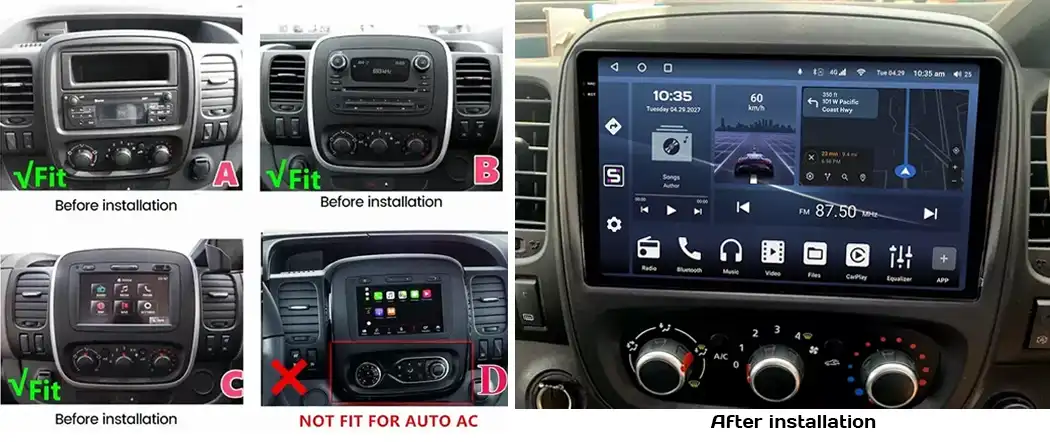
The head unit must perfectly match the mounting location (1-DIN, 2-DIN, or factory widescreen), the exact CAN-Bus protocol for your vehicle's model year and market, and retain factory features-climate control, parking sensors, cruise control, and OEM sound systems (Bose, JBL, Harman Kardon). Even within a single generation, CAN-Bus protocols and connectors can differ; always verify your exact model year and market variant via VIN rather than relying on general model names. See our compatibility guide for a step-by-step walkthrough.
2. "Cheaper Means Better Value"
A 50% price difference between visually identical head units usually hides fake memory specs (detectable only via full write tests), an outdated processor rebranded under a new series name, lack of post-sale support, and non-functional CAN-Bus decoders. Initial savings often lead to buying a replacement unit within six months.
3. Miscalculating RAM and ROM Requirements
Quick benchmark: 4+64 GB is the baseline for CarPlay/Android Auto without heavy use of native apps; 6+128 GB or 8+128 GB is optimal for running navigation, music streaming, and a dashcam (DVR) simultaneously; 8+256 GB and higher is built for power users running Android as a standalone OS. Read our RAM/ROM guide for detailed recommendations.
4. Ignoring the Processor
An "Octa-core" label says nothing about real-world speed-a three-year-old chip and a current-generation processor differ drastically in UI responsiveness and power efficiency. This directly impacts navigation loading times, system stability when operating a camera and Bluetooth concurrently, and long-term hardware durability. Compare platforms in our processor guide.
5. Not Clarifying CarPlay/Android Auto Specifications
"Supports CarPlay" and "supports wireless CarPlay" are distinct specifications. Always confirm dual-phone simultaneous connectivity, automatic connection upon engine ignition, and support for newer standards such as CarPlay Ultra. Read our full breakdown in the CarPlay vs. Android Auto guide.
6. Unconfirmed Retention of OEM Functions
A frequent post-installation complaint is loss of steering wheel controls or light/rain sensors. This occurs due to missing a dedicated CAN-Bus decoder for the specific vehicle trim or using a generic adapter instead of a vehicle-specific harness. Demand written confirmation from the seller for your exact trim level rather than accepting vague claims like "everything works."
7. Selecting a Screen Based Solely on Display Size
Display technology matters more than screen size: IPS delivers consistent color reproduction and wide viewing angles; QLED provides higher brightness and contrast, which is essential under direct sunlight. Higher resolution on spec sheets does not guarantee small text legibility on maps-always check peak brightness ratings in nits, especially in sunny climates.
8. Installation by Unqualified Installers
Even the highest-grade unit can be compromised by poor installation: wiring damage caused by cutting harness connectors, incorrect CAN-Bus configuration triggering dashboard errors, or compliance risks when retrofitting digital instrument clusters (see our vehicle inspection article). Choose a technician experienced specifically in CAN-Bus integration, not just basic speaker setups.
Mistake → Consequence → Solution
| Mistake | Consequence | How to Avoid |
|---|---|---|
| Unverified compatibility | Improper dash fit, CAN-Bus protocol conflicts | Verify VIN and exact trim generation before ordering |
| Choosing the lowest price | Faked memory specs, weak SoC, lack of technical support | Review independent hardware benchmark tests |
| Underestimating RAM/ROM | System slowdowns and UI lag over time | Select specs based on actual usage requirements |
| Ignoring processor specs | Sluggish response times, fast technical obsolescence | Check processor architecture and chip generation |
| Unspecified CarPlay mode | Missing auto-connect and wireless functionality | Explicitly request wireless connection confirmation |
| Unconfirmed OEM features | Loss of steering wheel controls or HVAC displays | Require seller confirmation for your exact vehicle model |
| Focusing only on screen size | Poor glare resistance and low daylight visibility | Verify panel matrix type and peak brightness in nits |
| Inexperienced installer | CAN-Bus error codes, damaged vehicle wiring harness | Hire a specialist experienced in Android head units |
FAQ
Can one head unit fit different model years of the same car? Not always. CAN-Bus protocols and wiring connectors frequently change mid-cycle. Always confirm your vehicle's exact year and regional market.
How much memory is required for navigation and CarPlay? 4+64 GB is standard; 6+128 GB or 8+128 GB provides optimal performance headroom for dashcams and native applications.
Is wireless CarPlay mandatory? It is optional, but offers significantly greater convenience with automatic connection upon entering the vehicle and zero cable clutter.
Does installing an Android head unit affect vehicle safety inspection? It depends on the installation quality and local regulations. The installation must not obstruct factory warning indicators or safety system messages (see our dedicated guide for details).
How can I verify the actual hardware memory specs from a seller? Request screenshots of system hardware benchmark tests rather than relying on product descriptions.
Prepared by the SMARTY Trend technical engineering team-delivering premium Android head units since 2010, supporting over 48 automotive brands worldwide.
Will an Android Head Unit Fit Your Car? Complete DIN Size, Dash Kit...
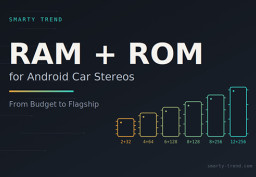
How to Choose RAM and ROM for an Android Car Stereo: 4+64, 6+128,...
Apple CarPlay Ultra and Android Head Units: Why You Can't Retrofit...

Android Head Unit Processors Guide 2026: Snapdragon vs. UIS Full...
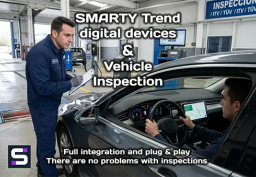
Does installing an Android screen or digital dash affect the MOT?
 EN
EN DE
DE
 ES
ES
 FR
FR
 IT
IT
 NL
NL
 PL
PL
 PT
PT
 RU
RU