




Porsche Macan 12.3" Dual Screen Installation: Expert Guide
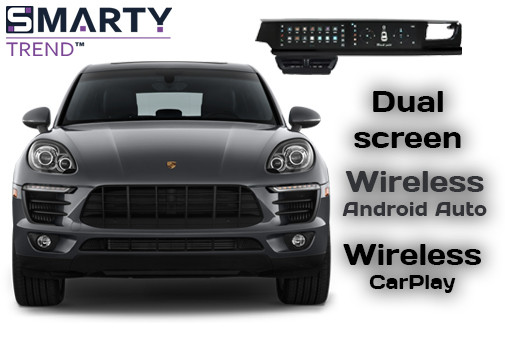
An expert engineering guide on installing the SMARTY Trend 12.3" + 12.3" dual screen navigation system in the Porsche Macan (2014+). Detailed step-by-step walkthrough for console removal, CAN-bus integration, retaining the OEM MOST fiber-optic amplifier, and configuring dual OS operation with full plug-and-play setup.
Installation Guide for SMARTY Trend 12.3" + 12.3" Dual Navigation System in Porsche Macan (2014+)
Specialists of our engineering and technical department have prepared a practical expert guide on replacing the factory PCM head unit with the SMARTY Trend Ultra-Premium (12.3″ + 12.3″) dual display. Based on our 15 years of experience in automotive electronics installation and CAN-bus integration for premium brands, we examine the entire technical process from disassembly to the intricacies of preserving the MOST optical fiber bus.
Table of Contents
- 1. Tools and Engineering Preparation
- 2. Step 1: Console and PCM Unit Disassembly
- 3. Step 2: CAN-bus Hookup and MOST Optics Integration
- 4. Step 3: Brackets Mounting and Peripherals Routing
- 5. Step 4: Installation and Securing of the 12.3″ + 12.3″ Dual Panel
- 6. Step 5: Setup, Transmission Lines Verification, and Assembly
- 7. Comparison Table: PCM vs SMARTY Trend
- 8. Frequently Asked Questions (FAQ)
Tools and Engineering Preparation
Working with the Porsche interior requires high precision. Before starting installation, disconnect the onboard electrical system (disconnect the battery negative terminal) or wait at least 15 minutes for Gateway control units to enter sleep mode.
Required tool kit:
- Set of plastic trim removal tools (spudgers) of varying rigidity.
- Wrench with TORX bits (T20, T25).
- Protective cover for the gear selector and masking tape to protect leather elements.
- Optical loop-back connector (if diagnostics are needed).
- PDF Installation Instructions.
Step 1: Console and PCM Unit Disassembly
Our practical experience shows that the main risk when disassembling the Macan is damaging the chrome air vent surrounds. For safe disassembly, follow this sequence:
- Protect the gearshift lever and associated plastic elements with masking tape.
- Using a plastic pry tool, gently lift the side air vents located to the left and right of the factory screen. Release the spring clips by carefully pulling the air ducts toward you.
- Disconnect the control button connectors on the vents (if present).
- Unscrew 4 TORX T20 screws securing the PCM 3.1 or PCM 4.0 head unit.
- Extract the PCM unit and disconnect the main Quadlock connector, FAKRA radio antenna connector, and the optical line.
Step 2: CAN-bus Hookup and MOST Optics Integration
The main engineering nuance when working with Bose and Burmester audio systems is preserving the integrity of the MOST fiber-optic network. Loss of signal in this section will result in no sound in the vehicle.
Connection sequence:
- Extract the 2-pin optical plug (black housing with green light guides) from the original Quadlock connector.
- Insert the optical plug into the corresponding slot of the new SMARTY Trend wiring harness without cable bends (minimum bending radius of 25 mm).
- Connect the original Quadlock to the SMARTY Trend pin-to-pin adapter and lock the lever latch.
- Connect the external CAN-bus decoder included in the kit for proper transmission of steering wheel controls and door statuses.
Step 3: Brackets Mounting and Peripherals Routing
For stable navigation and cellular operation, correct placement of antenna modules inside the dashboard is required:
- GPS antenna: Secure the module to the metal dashboard reinforcement under the windshield. The black face should point upward.
- 4G LTE antenna: Route the cable near the front right A-pillar to eliminate interference from power circuits.
- USB and SIM slot: Route remote USB ports and the Micro-SIM slot into the glove compartment.
- Cameras: Connect the analog AHD rear-view camera signal cable or the factory 360-degree camera system interface.
Step 4: Installation and Securing of the 12.3″ + 12.3″ Dual Panel
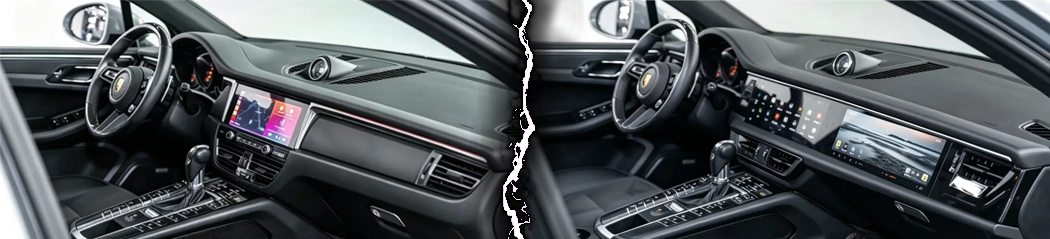
The dual monoblock features increased dimensions relative to the factory screen. Secure the special mounting bracket included in the set into the standard dashboard mounting holes of the Porsche Macan using TORX screws.
Connect the main video ribbon cable, LVDS cable for PCM interface transmission, and power supply to the rear of the SMARTY Trend monoblock display. Ensure the wiring behind the unit is not pinched by dashboard metal structures when seating the device into position.
Step 5: Setup, Transmission Lines Verification, and Assembly
Before full interior assembly, the engineering team recommends checking all components:
- Connect the battery and turn on the ignition.
- Verify correct Android 13 bootup and switching to original Porsche (PCM) mode.
- Ensure sound output across all channels and check steering wheel volume control operation.
- Verify screen switching when engaging reverse gear (R).
- Ensure wireless connection of Apple CarPlay and Android Auto.
- Install the air vents and trim panels in reverse order.
System Comparison Table
| Parameter / Function | Factory PCM 3.1 / 4.0 System | SMARTY Trend Dual Screen (12.3″ + 12.3″) |
|---|---|---|
| Display | 7.0″ / 8.4″ (base resolution) | Dual 12.3″ + 12.3″ Ultra-Wide IPS (3840x720 px) |
| Operating System | Porsche factory firmware | Android 13 + retention of original PCM menu (Dual OS) |
| Smartphone Integration | Limited (wired CarPlay only in PCM 4.0) | Wireless Apple CarPlay & Android Auto |
| Navigation | Stationary (maps on SD/CD) | Any online services (Waze, Google Maps) with live traffic |
| Connectivity and Internet | Absent / Limited | Built-in 4G LTE modem (Micro-SIM) + Wi-Fi |
| Audio Processing | Basic equalizer | Built-in DSP (TDA7850, time alignment, filters) |
| Retention of OEM Functions | Full | Full (steering wheel buttons, parking sensors, car settings) |
Frequently Asked Questions (FAQ)
Will factory Porsche settings and the original menu be retained?
Yes. The device operates on a Dual OS scheme. You retain access to all factory PCM functionality, including suspension adjustments, trip computer data, and climate control.
Does the system work with Bose / Burmester audio?
Yes, thanks to transferring the original MOST optical cable into the SMARTY Trend interface harness connector, the factory amplifier operates normally without audio quality loss.
Is factory wiring modification required?
No. Installation is performed using a Plug-and-Play (Pin-to-Pin) principle into the vehicle's factory connectors without cutting or damaging wires.
Are steering wheel controls preserved?
Yes, the included CAN module fully decodes Porsche bus signals, including volume control, track switching, and voice assistant activation.
Find the Perfect Android System for Your Porsche at SMARTY Trend
Need an engineer's consultation on selecting a head unit for your VIN? Contact SMARTY Trend specialists right now!
Browse Porsche Android Head Units Catalog

| Operation system: | Android 13 |
| Display: | 12.3 + 12.3 inches IPS |
| Resolution: | Ultra Wide (3840x720 px) |
| Processor: | 2.0 GHz Octa-core (P60 Mediatek) |
| RAM + SSD: | 8+128 Gb |
| Car link: | Wireless Apple CarPlay & Android Auto |
| Free gift: | DVR with ADAS / TPMS / HD Rear Camera |
Zero-Loss Upgrade: How to Install an Android Head Unit and Retain...
Does Installing an Android Head Unit Void Your Car Warranty? Full...

CarPlay Ultra: Why It’s Stalled and What Alternative to Choose
Top Mistakes When Choosing and Buying an Android Car Stereo:...
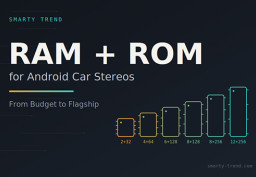
How to Choose RAM and ROM for an Android Car Stereo: 4+64, 6+128,...
 EN
 DE
 ES
 FR
 IT
 NL
 PL
 PT
 RU