




Android Head Unit Battery Drain: How to Fix It
Learn why an Android head unit drains a car battery after key-off and how to separate normal deep sleep from standby, CAN-bus wake loops, or wiring mistakes. Follow our step-by-step measurement and setup guide to keep quiescent current draw low and protect your battery.
Quick Answer: A properly installed Android head unit does not drain a healthy car battery when parked, drawing only 3 to 15 mA (less than 0.36 Ah per day) in Deep Sleep / Dormancy mode. Parasitic battery drain (exceeding 100-500 mA, which can flatten a battery in 2-3 days) occurs for three main reasons: swapped constant power (B+, yellow) and ignition (ACC, red) wires, an active CAN-bus line caused by an incorrect decoder protocol, or "Fast Boot" mode left on with an infinite shutdown delay. To fix this, set the head unit to Dormancy / Deep Sleep, configure the power-off delay between 30 seconds and 10 minutes, and verify quiescent current draw at the negative battery terminal 40-60 minutes after locking the vehicle.
What Actually Happens: Insights from Reddit, XDA, and Automotive Workshops
When a starter motor refuses to crank the morning after installing a new screen, owners usually blame the battery or the alternator. However, an analysis of hundreds of technical threads across XDA Developers, Reddit (r/Androidheadunits, r/MechanicAdvice, r/CarAV), and Briskoda reveals a consistent pattern: modern Android head units have four distinct "off" states, and three of them continue consuming power behind a black screen.
Across automotive electronics communities, three root causes account for almost every case of overnight or weekend drain:
- Standby Illusion Instead of Deep Sleep: On XDA Developers, users of entry-level platforms (such as older YT9216 or unoptimized PX6 boards without proper MCU power management) regularly measure a standby draw of 200-500 mA with the display turned off. The CPU, Wi-Fi/4G modems, and audio amplifier remain energized to deliver an instant 1-second resume.
- CAN-Bus Wake Loops: On VAG (Briskoda) and BMW (
r/F30) forums, owners frequently report that a mismatched CAN-bus decoder continues broadcasting data packets after the doors are locked. The vehicle's Body Control Module (BCM) interprets this traffic as active user operation and prevents the car's power relays from entering sleep mode. - Direct Wiring Shortcuts: In non-CAN installations discussed on
r/CarAV, twisting the red (ACC) and yellow (B+) wires together onto a permanent 12 V feed is a common DIY shortcut. Without an ignition sense drop, the head unit never receives the key-off trigger.
Industry Benchmarks for Parasitic Draw: Engineering Standards
To separate normal electronic standby from a genuine fault, automotive electrical engineers rely on established diagnostic thresholds:
- Quiescent Current Standards (AAMCO Technical Training, CTEK, Optima Batteries): In a modern passenger vehicle with doors closed and the factory alarm armed, total parasitic current draw across all onboard modules should sit between 15 and 50 mA (up to 50-85 mA in luxury vehicles equipped with multiple gateway modules). Any sustained draw above 100 mA is classified as a parasitic fault requiring circuit isolation.
- Critical Reserve Voltage Rule (Battery Council International / BCI): A standard 50-60 Ah lead-acid starter battery cannot deliver its full nominal capacity for engine cranking. According to technical guidelines from Optima Batteries and AAA (American Automobile Association), once resting open-circuit voltage drops to 12.2 V (~50% state of charge) or below 12.0 V (~25% state of charge), cranking amperage falls short - especially around 0 °C (32 °F), where battery efficiency drops by roughly 15% while engine cranking demand rises by up to 65%.
- Circuit Integrity Standards (SAE J1284 and ISO 8820): Corroded fuse blades or low-grade aluminum aftermarket fuses create voltage drop across the
ACCsense line, preventing the head unit's Microcontroller Unit (MCU) from detecting a clean key-off transition.
Power States and Battery Drain Comparison Table
The calculations below are based on a healthy 60 Ah automotive starter battery with an effective usable reserve of 30 Ah (50% capacity) before cranking performance degrades.
| Head Unit Power State | Components Remaining Powered | Current Draw | Daily Consumption | Days to Critical Discharge (30 Ah) | Startup Behavior |
|---|---|---|---|---|---|
| Hard Off (Complete Shutdown) | Non-volatile settings memory and internal RTC clock only | 1 - 3 mA | 0.02 - 0.07 Ah | Over 1 year (limited by battery self-discharge) | Full cold Android boot (20-30 seconds with boot logo) |
| Deep Sleep (Dormancy Mode) | System RAM state and low-power MCU wake interrupt | 3 - 15 mA | 0.07 - 0.36 Ah | 80 - 400 days (within OEM automotive limits) | Instant resume in 1-2 seconds |
| Standby (Fast Boot Active) | CPU in background state, 4G modem, Wi-Fi, data bus | 150 - 250 mA | 3.6 - 6.0 Ah | 5 - 8 days (2-3 days in winter on an aged battery) | Screen illuminates immediately on key turn |
| Active Bus Loop (Hung CAN Decoder) | Head unit awake plus vehicle BCM kept out of sleep | 400 - 800 mA | 9.6 - 19.2 Ah | 1.5 - 3 days | Dead battery after a weekend parked |
| Display Off with Active Amplifier | Internal power amplifier, button illumination, USB peripherals | 800 - 1200 mA | 19.2 - 28.8 Ah | Under 24 hours | Complete battery depletion overnight |
Engineering Checklist: 4 Steps to Diagnose and Eliminate Battery Drain
Step 1. Configure Sleep Mode and Shutdown Timers in Android Settings
Before removing dashboard trim or visiting an auto electrician, verify the firmware power settings. On modern platforms (including SMARTY Trend head units powered by UIS7862 and UIS7870 processors), power logic is controlled in two menus:
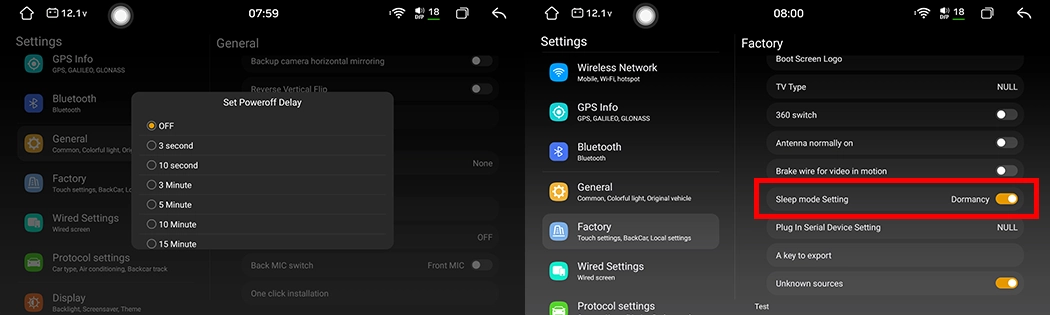
- Power-off Delay (ACC Off Delay): Navigate to Settings > General > Power-off Delay. Ensure the timer is not set to Never or Infinite. For daily driving, set a window between 30 seconds and 10 minutes so the unit stays ready during brief stops (such as refueling) without draining the battery overnight.
- Enable Deep Sleep (Dormancy): Open Factory Settings (on UIS7870 platforms, the standard service code is
3368; on other builds, check8888or126). Locate Sleep mode settings and select Dormancy. This instructs the MCU to cut power to peripheral rails and park the processor in ultra-low-power state while preserving RAM.
Step 2. Measure Quiescent Current Draw Properly (SAE / CTEK Method)
Measuring current immediately after shutting off the engine produces false readings. Modern vehicles (especially VAG, BMW, Mercedes-Benz, and Ford models) shut down electronic control modules in stages over 15 to 40 minutes after locking.
- Open the hood and latch the hood lock mechanism with a screwdriver so the vehicle alarm registers the hood as closed.
- Close all doors, lock the car with the factory remote, and move keyless-entry fobs at least 5-10 meters away to prevent continuous proximity antenna polling.
- Wait 45 to 60 minutes for all vehicle modules to enter full sleep.
- Clamp a DC Clamp Meter around the negative battery cable. If using an inline multimeter in series on the negative terminal, connect it via a bypass jumper before shutting off the ignition so opening the circuit does not reset hung control modules.
- If total draw exceeds 80-100 mA, pull the head unit fuse. If the reading drops to a normal 20-40 mA, the drain is isolated to the head unit circuit.
Step 3. Verify Power Harness Pinout (Yellow B+ and Red ACC)
For vehicles wired via standard analog ISO harnesses without a digital CAN-bus decoder (common in pre-2005/2008 vehicles and many Japanese platforms):
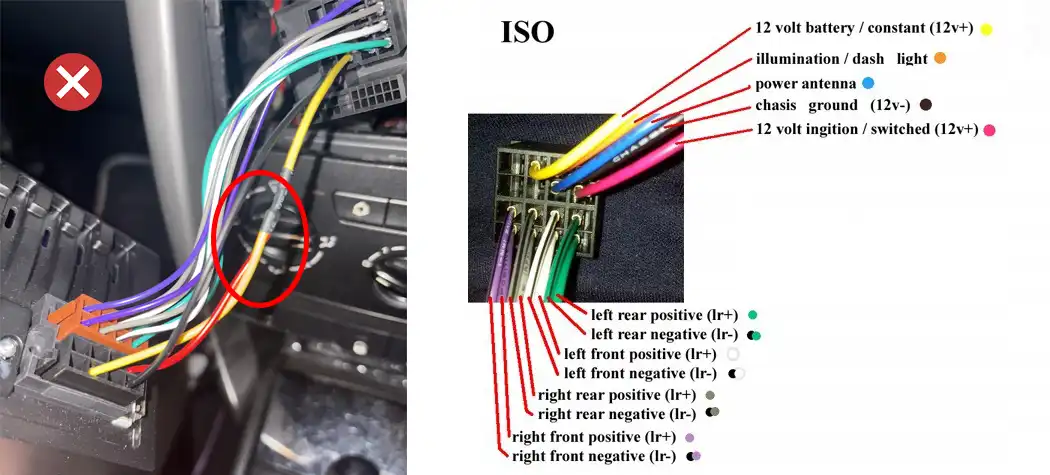
- Yellow Wire (
B+/ Battery): Must connect to a constant +12 V circuit to retain memory and power the main rail. - Red Wire (
ACC/ Ignition): Must receive +12 V strictly when the ignition key is in the ACC or ON position. - Common Pinout Swap: Several European manufacturers (including older Volkswagen, Skoda, Opel, and Peugeot models) reverse the
B+andACCpositions in the factory ISO connector. Failing to swap them on the adapter harness causes memory loss and can keep illumination or control circuits energized. - Rear-View Camera Trigger: Never wire the camera power or the
BACK / REVERSEtrigger wire to a constant +12 V source. Doing so locks the head unit in active video input mode with the backlight energized all night.
Step 4. Inspect the CAN-Bus Decoder Box
In CAN-bus equipped vehicles, the ignition-off command is transmitted digitally from the BCM to the head unit's CAN decoder rather than via an analog switched wire.
- Protocol Selection: Verify that Factory Settings > Car Selection matches the exact CAN decoder brand (Raise, Simple Soft, Hiworld, Luzheng), vehicle make, model, and production year. An incorrect protocol prevents the decoder from recognizing the bus sleep frame.
- Thermal Check: Thirty minutes after locking the car, touch the plastic housing of the CAN decoder behind the head unit. A sleeping decoder feels completely cool to the touch; a warm housing indicates an active microcontroller keeping the data bus awake.
- SMARTY Trend Hardware Architecture: SMARTY Trend head units utilize matched CAN-bus interfaces with Active Acknowledgment logic that places TX/RX transceivers into a high-impedance state immediately upon door lock. This limits module quiescent draw to under 5 mA and prevents phantom fault codes in the vehicle's diagnostic log.
Frequently Asked Questions (FAQ)
1. Can I leave my Android head unit in Standby (Fast Boot) mode overnight?
Yes, for a single night. Even at a standby draw of 150-200 mA, the unit consumes roughly 1.5-2.0 Ah over 10 hours, which will not prevent a healthy battery from starting the engine the next morning. The risk arises when the vehicle sits parked for 3 to 5 consecutive days, such as at an airport or during freezing winter weather. For multi-day parking, always enable Dormancy / Deep Sleep.
2. Why does the screen wake up every time I open a car door or the trunk?
This is normal CAN-bus behavior. Opening a door wakes the vehicle's Body Control Module, which broadcasts a door-status frame across the network that triggers the head unit. If the ignition is not turned on, the head unit returns to sleep automatically once its standby timer expires (typically 30-60 seconds), having negligible impact on daily battery health.
3. Do I need to disconnect the battery terminal to test for parasitic drain?
No, if you use a DC clamp meter, which measures current non-invasively around the negative battery cable without breaking the circuit. If you use a standard multimeter in series (10 A mode), you must disconnect the negative terminal, but always bridge the connection first while turning off the car so you do not interrupt power and inadvertently reset the module causing the drain.
4. Will installing a higher-capacity battery solve the drain issue?
No. Upgrading to a 75 Ah or 90 Ah battery only delays a no-start condition by one or two days. Repeated deep discharges accelerate lead-plate sulfation (which CTEK research shows intensifies whenever resting voltage drops below 12.4 V), permanently ruining even a brand-new battery within a single season. The underlying wiring or sleep configuration must be corrected.
5. Does a built-in 4G SIM card slot increase battery drain while parked?
When the head unit is properly configured in Dormancy / Deep Sleep mode, the MCU cuts power directly to the SIM slot and LTE modem, resulting in zero additional current draw while parked. Cellular modem draw only occurs if the system is intentionally kept in active Standby mode for continuous GPS tracking or remote telemetry.
Connecting a Factory Amplifier to an Android Head Unit

Android Head Units on UIS 7870 FAQ: Service Codes, Settings, and...
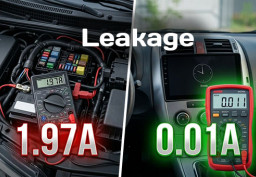
Is Your Head Unit Draining the Battery? Step-by-Step Guide: How to...

Zero-Loss Upgrade: How to Install an Android Head Unit and Retain...
Does Installing an Android Head Unit Void Your Car Warranty? Full...
 EN
 DE
 ES
 FR
 IT
 NL
 PL
 PT
 RU