




Come scegliere RAM e ROM per un autoradio Android: 4+64, 6+128 o 8+128?
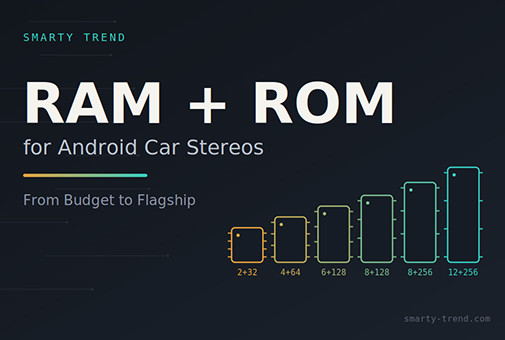
Una guida sistematica alla scelta della memoria RAM e ROM per autoradio Android, con un'analisi dei tipi di archiviazione (eMMC vs UFS), chipset e scenari d'uso reali.
Guida alla scelta di RAM e ROM per autoradio Android: 2+32, 4+64, 6+128, 8+128, 8+256 o 12+256 – Cosa serve davvero
Una delle domande più frequenti prima di acquistare un'autoradio Android è: «Quale versione di memoria conviene scegliere – 4+64 oppure passare direttamente a 8+128?». La differenza di prezzo tra due configurazioni adiacenti può variare da 40 a 60 euro, mentre il divario in termini di comfort d'uso quotidiano può risultare quasi impercettibile. O viceversa: risparmiando sulla memoria, dopo sei mesi ci si ritrova con rallentamenti nell'esecuzione simultanea del navigatore e della musica.
In questo articolo affrontiamo la questione in modo sistematico: cosa indicano i valori RAM/ROM, come si collegano al processore e al tipo di memoria interna (eMMC o UFS), quale configurazione si adatta a ciascuno scenario d'uso e cosa dicono i proprietari sui forum di settore come XDA Developers, Reddit r/CarAV e le comunità specializzate in car audio. Il materiale viene aggiornato regolarmente con l'uscita di nuovi chipset per offrire una guida completa alla scelta del dispositivo.
1. Cosa significano RAM e ROM in un'autoradio Android
Nelle specifiche tecniche di qualsiasi autoradio Android viene riportata una dicitura del tipo «4+64» o «8+128». Il primo valore indica la memoria RAM, mentre il secondo si riferisce alla memoria interna (ROM/eMMC/UFS). Il principio è lo stesso degli smartphone, ma adattato al contesto automobilistico: escursioni termiche da -20°C in inverno a +70°C nell'abitacolo in estate, vibrazioni e continui cicli di accensione e spegnimento all'avvio del motore.
La RAM è la memoria di lavoro in cui risiedono simultaneamente tutti i processi attivi: navigatore, riproduttore audio, chiamate Bluetooth, sincronizzazione in background ed eventuale cruscotto digitale se collegato tramite CarPlay/Android Auto. Maggiore è la RAM, più applicazioni il sistema riesce a gestire in background senza dovendo chiuderle e senza scatti nel passaggio da un'app all'altra.
La ROM (eMMC o UFS) costituisce l'archiviazione permanente: contiene il sistema operativo, le app installate, le mappe offline, la musica e i filmati della telecamera di bordo integrata. Dalla capacità della ROM dipende la quantità di applicazioni e dati memorizzabili; dal tipo di memoria (eMMC o UFS) dipendono la velocità di caricamento e la reattività generale del sistema.
Un dettaglio fondamentale spesso trascurato dagli acquirenti: la RAM determina la velocità e il multitasking, mentre la ROM determina la capacità di archiviazione. Un processore performante con 8 GB di RAM abbinato a una memoria eMMC 5.1 lenta può risultare meno fluido rispetto a un modello con 6 GB di RAM e memoria UFS di ultima generazione.
2. Come il processore definisce il limite reale delle prestazioni
Il volume di RAM/ROM non va valutato isolatamente: i produttori abbinano specifici chipset a determinate quantità di memoria con un preciso criterio. Un processore economico non sarà in grado di sfruttare appieno 8 GB di RAM, mentre un processore avanzato sarà limitato da soli 2 GB di RAM.
| Classe del chipset | Esempi tipici | Configurazione RAM/ROM standard | Segmento |
|---|---|---|---|
| Base (MediaTek MT6xxx, Allwinner T3/T5) | MTK6771, Allwinner T5 | 2+32, talvolta 3+32 | Economico |
| Intermedio (Unisoc/Spreadtrum) | UIS7862, UIS8581 | 4+64, 6+128 | Fascia media |
| Avanzato (Top di gamma Unisoc, alcuni MTK 8-core) | UIS7862S, UIS7870CS, MTK8256 | 6+128, 8+128 | Medio-Premium |
| Qualcomm Snapdragon Automotive, UIS | SA6155, SA8155, UIS7870CS | 8+128, 8+256, 12+256 | Premium |
| Qualcomm Automotive Flagship | SA8155P, SA8295 | 8+256, 12+256 | Top di gamma |
In altri termini, la quantità di memoria è un indicatore indiretto del livello complessivo della piattaforma, inclusa la qualità del modulo radio, dell'amplificatore e del chip DSP, che i produttori affiancano solitamente ai processori più potenti. Come confermato dagli utenti sui forum (Sezione 5), una memoria superiore è spesso accompagnata da una componentistica di livello più alto nell'intero dispositivo.
3. Tabella comparativa principale: 2+32 vs 4+64 vs 6+128 vs 8+128 vs 8+256 vs 12+256
| Configurazione | A chi è adatta | Multitasking | Processore tipico | Spazio per mappe/musica | Durata di rilevanza |
|---|---|---|---|---|---|
| 2+32 GB | Solo proiezione CarPlay/Android Auto, senza installazione diretta di app | 1-2 app leggere | Base (MTK/Allwinner) | Minimo – la maggior parte dello spazio è occupata dal sistema | 1,5-2 anni |
| 4+64 GB | Navigazione + musica + chiamate, uso quotidiano standard | 2-3 app senza rallentamenti | Unisoc di fascia media | Adeguato per 1-2 mappe offline + playlist | 3-4 anni |
| 6+128 GB | Utenti attivi: navigazione, streaming, dashcam, assistente vocale | 3-4 app contemporaneamente | Unisoc UIS7862S avanzato / MTK 8-core | Sufficiente per diverse regioni di mappe offline e libreria multimediale | 4-5 anni |
| 8+128 GB | Stesso scenario della 6+128, ma con riserva di reattività nei picchi di carico | 4-5 app, inclusa navigazione avanzata | Unisoc UIS7870CS / Snapdragon base | Sufficiente per la maggior parte degli utenti | 5 anni |
| 8+256 GB | Ampie librerie multimediali, più telecamere, molte app installate | 5+ app senza perdite di fluidità | Snapdragon SA6155/SA8155 | Ampio spazio di riserva – nessuna necessità di pulizia del sistema | 5-6 anni |
| 12+256 GB | Auto premium e di lusso, digital cockpit con più schermi | Praticamente illimitato per le esigenze di un'autoradio | Snapdragon SA8155P/SA8295 UIS7870CS |
Eccessivo per il 95% degli utenti | 6+ anni |
Conclusione principale della tabella: Per la maggior parte degli automobilisti, la scelta ideale si attesta su 6+128 GB oppure 8+128 GB. La configurazione 4+64 GB rimane valida per chi non necessita di molte app in background, mentre la 2+32 GB va considerata solo come soluzione economica per il semplice mirroring con CarPlay/Android Auto. La spesa per una 12+256 GB trova giustificazione principalmente su vetture di lusso dotate di più schermi interconnessi.
4. eMMC vs UFS: perché il tipo di memoria conta più della capacità
Molti acquirenti valutano esclusivamente la quantità di gigabyte senza considerare il tipo di memoria. La differenza è consistente:
| Parametro | eMMC 5.1 | UFS 2.1 | UFS 3.1 |
|---|---|---|---|
| Architettura dell'interfaccia | Parallela (pacchetti su bus condiviso) | Seriale, Full-Duplex | Seriale, Full-Duplex, linee multiple |
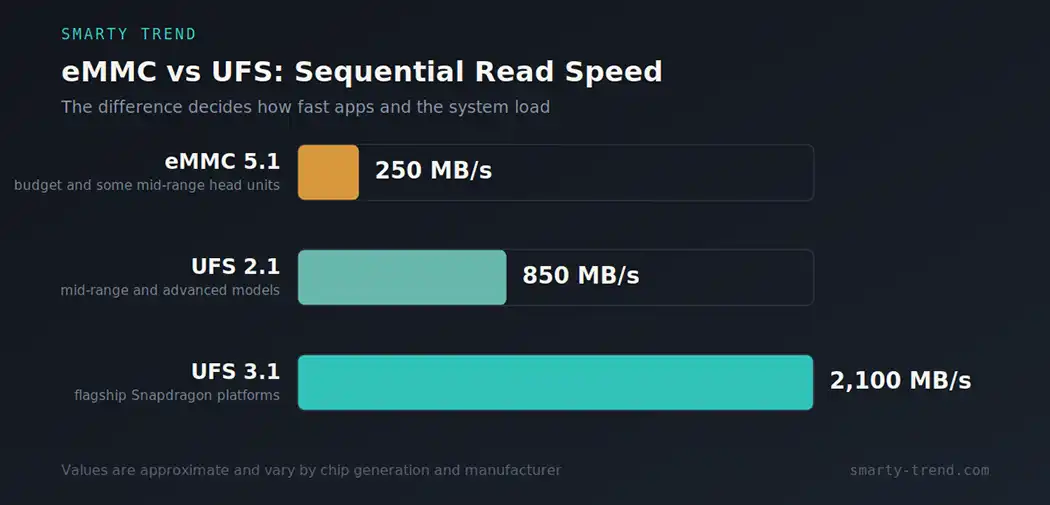
| Velocità di lettura sequenziale | ~250-320 MB/s | ~800-850 MB/s | ~1900-2000+ MB/s |
| Velocità di scrittura sequenziale | ~100-125 MB/s | ~250-260 MB/s | ~400+ MB/s |
| Lettura e scrittura simultanee | No (Half-Duplex) | Sì | Sì |
| Impatto sull'avvio del sistema | Nettamente più lento | Avvio rapido | Quasi istantaneo |
| Diffusione tipica | Autoradio economiche e di fascia media base | Modelli di fascia media e avanzata | Piattaforme Qualcomm Snapdragon top di gamma |
All'atto pratico, un dispositivo con 6 GB di RAM e memoria UFS risulta spesso più veloce e reattivo rispetto a un modello con 8 GB di RAM basato su memoria eMMC 5.1. Il settore automotive sta progressivamente abbandonando la tecnologia eMMC a favore dello standard UFS per soddisfare le richieste dei moderni sistemi multimediali.
Consiglio pratico: A parità di condizioni, verificate sempre con il rivenditore il tipo di memoria integrata e non solo la capacità. I rivenditori trasparenti indicano questa specifica nella scheda del prodotto o la forniscono su richiesta.
5. Cosa dicono nei forum: le opinioni degli utenti
Abbiamo esaminato le discussioni sulle principali piattaforme di settore – discussioni su XDA Developers dedicate ai sistemi Unisoc e Qualcomm, la sezione r/CarAV di Reddit e i forum specializzati in car audio. Si evidenziano alcune considerazioni ricorrenti:
- Relazione tra memoria e componenti hardware. Gli utenti più esperti sottolineano come i produttori tendano ad abbinare alle versioni con più RAM chip radio e moduli di amplificazione di qualità superiore. Acquistare una variante con più memoria significa spesso ottenere una componentistica complessivamente migliore.
- 4 GB di RAM come nuovo valore minimo. Se in passato 2 GB rappresentavano il limite accettabile, nelle discussioni attuali si raccomanda di non scendere sotto i 4 GB se si intende utilizzare app direttamente sull'autoradio oltre alle funzioni CarPlay/Android Auto.
- 2 GB di RAM – Indicati per la sola proiezione. Chi utilizza dispositivi da 2 GB di RAM conferma che la capacità è sufficiente per Android Auto/CarPlay in modalità mirroring, ma l'esecuzione contemporanea di navigatori impegnativi (come Waze) e streaming audio direttamente dall'autoradio genera evidenti rallentamenti.
- Rischio di discrepanze nelle specifiche. Sui forum si riscontrano casi di dispositivi venduti per 4 GB di RAM che integravano in realtà processori di classe inferiore. È quindi preferibile acquistare da rivenditori affidabili con politiche di reso trasparenti.
- Il processore incide più dei soli gigabyte. Il consenso generale conferma che il tipo e la generazione del processore (come i chip Unisoc a 8 core o le piattaforme Qualcomm Snapdragon) determinano la fluidità del sistema in misura pari o superiore alla quantità di RAM/ROM.
Queste rilevazioni trovano conferma nei nostri test effettuati sui dispositivi dal 2010 a oggi: i problemi di lentezza sono quasi sempre riconducibili a una RAM insufficiente per la gestione di più app o a una memoria interna lenta, piuttosto che alla semplice mancanza di spazio di archiviazione.
6. Matrice di scelta in base all'utilizzo
| Scenario d'uso | Configurazione consigliata | Motivazione |
|---|---|---|
| Utilizzo esclusivo di CarPlay/Android Auto senza installare app sull'autoradio | 2+32 o 4+64 GB | L'elaborazione principale avviene sullo smartphone; l'autoradio deve solo riprodurre l'interfaccia in modo stabile |
| Navigazione + musica + chiamate, utilizzo quotidiano standard | 4+64 o 6+128 GB | Ottima fluidità senza spese inutili per risorse inutilizzate |
| Uso di mappe offline regionali, telecamera da bordo e assistente vocale | 6+128 GB | Spazio sufficiente per contenuti e RAM adeguata per gestire più servizi contemporaneamente |
| Numerose app installate, passaggi frequenti tra navigatore e riproduzione multimediale | 8+128 o 8+256 GB | La RAM aggiuntiva evita blocchi o scatti durante il cambio di applicazione |
| Veicolo con più schermi integrati (quadro strumenti digitale, schermi posteriori, HUD) | 8+256 o 12+256 GB | Ogni schermo o flusso dati supplementare richiede maggiori risorse a RAM e memoria interna |
| Utilizzo previsto dell'auto per oltre 5 anni senza pianificare aggiornamenti futuri | 8+128 GB come scelta di base consigliata | Bilanciamento ottimale tra spesa iniziale e durata nel tempo |
7. I 7 errori principali nella scelta della memoria
- Considerare solo i gigabyte di RAM ignorando la tecnologia di archiviazione (eMMC/UFS). Una memoria UFS rapida con una RAM media garantisce un'esperienza migliore rispetto a una memoria eMMC lenta abbinata a molta RAM.
- Acquistare la versione 12+256 GB utilizzandola solo per il mirroring di CarPlay. In questo caso la memoria in eccesso non produce vantaggi visibili.
- Scegliere la versione 2+32 GB prevedendo di installare ed eseguire più app. Rappresenta la causa principale di insoddisfazione e successiva sostituzione dell'unità.
- Non verificare la sigla del processore affidandosi solo ai dati RAM/ROM. La dicitura «4+64» può essere presente su processori dalle prestazioni completamente differenti.
- Non considerare l'espansione via microSD. Lo slot per schede di memoria consente di espandere lo spazio per i dati, ma non risolve i limiti dovuti a una RAM ridotta.
- Scegliere l'offerta più economica senza valutare l'affidabilità del venditore. In questi casi è più frequente riscontrare specifiche difformi da quelle dichiarate.
- Non calcolare il periodo di utilizzo dell'autovettura. Se si prevede di tenere l'auto per 5 o più anni, è consigliabile scegliere una configurazione con un margine di memoria adeguato.
8. Come verificare la correttezza delle specifiche dichiarate
- Richiedete il codice esatto del processore (es. UIS7862 o SA6155) oltre alla semplice indicazione «4+64» per verificarlo tramite fonti terze.
- Chiedete esplicitamente se la memoria interna è di tipo eMMC oppure UFS.
- Controllate le recensioni che fanno riferimento alla verifica hardware effettuata con app diagnostiche.
- Acquistate da rivenditori con garanzia ufficiale e un servizio di assistenza chiaro.
9. Raccomandazione finale
In sintesi: per la maggior parte degli automobilisti il rapporto ideale tra costo e prestazioni è rappresentato dalle versioni 6+128 GB oppure 8+128 GB con processori Unisoc di nuova generazione o Qualcomm Snapdragon Automotive abbinati a memorie UFS. La configurazione 4+64 GB rimane una valida scelta per un utilizzo semplice, mentre la 2+32 GB è raccomandata esclusivamente per l'uso tramite CarPlay/Android Auto. Le varianti 8+256 GB e 12+256 GB sono indicate principalmente per auto di fascia alta con sistemi multi-schermo o per chi desidera la massima riserva di prestazioni nel tempo.
Domande frequenti (FAQ)
È più importante la RAM o la ROM?
Per la velocità e la fluidità complessiva sono determinanti la RAM e la tipologia di archiviazione (eMMC/UFS). Per il numero di app installabili e il salvataggio dei dati è fondamentale la ROM. Si tratta di parametri differenti che vanno considerati insieme.
Come si manifesta la mancanza di RAM nell'autoradio?
I segnali principali sono: ritardo nella risposta al cambio applicazione, blocchi quando si usano contemporaneamente navigatore e musica, tempi lunghi all'avvio del motore e chiusura improvvisa delle app in background.
Conviene scegliere 12+256 GB «per sicurezza»?
Solo se il veicolo dispone di più schermi integrati (quadro strumenti digitale, schermi posteriori, HUD) o se prevedete di utilizzare intensamente molte applicazioni in contemporanea negli anni. In un utilizzo normale la differenza tra 8+128 GB e 12+256 GB non è percepibile nella guida di tutti i giorni.
Articolo redatto dal team di Smarty Trend sulla base dell'esperienza diretta nei test di autoradio Android dal 2010, della documentazione tecnica dei produttori di microchip e dell'analisi delle discussioni sui forum internazionali di settore (XDA Developers, Reddit r/CarAV e forum dedicati al car audio). Il testo viene aggiornato regolarmente in base alle novità di mercato.
Apple CarPlay Ultra e autoradio Android: perché non si può...
CarPlay vs Android Auto nel 2026: quale scegliere per il tuo...
Come impostare il suono DSP sull'autoradio Android

Guida ai processori per autoradio Android 2026: Confronto completo...

I migliori autoradio Android 2026: Guida definitiva all'upgrade...
 IT
IT DE
DE
 EN
EN
 ES
ES
 FR
FR
 NL
NL
 PL
PL
 PT
PT
 RU
RU