




Android Head Units on UIS 7870 FAQ: Service Codes, Settings, and Troubleshooting
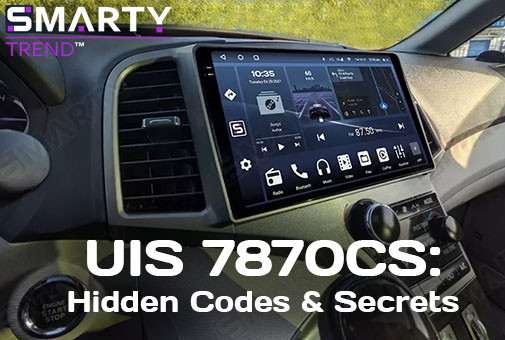
I would like to share with you a knowledge base founded on our years of hands-on experience. In this article, SMARTY Trend technical specialists answer the most frequently asked questions regarding the setup and maintenance of Android head units powered by the popular UIS 7870 processor with a 2K display.
Quick Overview
Installation and maintenance guide for Android head units (HUs) powered by the UIS 7870SC processor (2.7 GHz) with a 2K display. In this article: factory service codes (3368, 5768, 7870) and the engineering menu, Dormancy sleep mode and methods to stop battery drain, precise matrix backlight adjustment, rearview camera and 360-degree surround view system setup, steering wheel control (SWC) programming, video output to monitors, and cooling fan control.
Menu item names are given as they appear in the HU interface (in English). Depending on the firmware version, the names and locations of individual items may vary slightly. Updated: October 20, 2026.
Quick Troubleshooting Summary Table:
| Category / Task | Service Code / Menu | Path in HU Settings | Quick Solution |
|---|---|---|---|
| Factory Settings | 3368 |
Settings → Factory | Access system parameters |
| Engineering Menu | )83781(= |
Calculator app | Enter the combination in the calculator |
| Developer Mode | 3368 or 7870 |
Settings → Developer menu | USB debugging and advanced settings |
| Sleep Mode (Battery Drain) | - | Factory → Sleep mode settings | Set status to Dormancy |
| Screen Off Delay | - | General → Set poweroff delay | Select interval (from 3 sec to 15 min) |
| Startup Volume | - | Settings → Sound → Default volume switch | Set level in the Default boot submenu |
| 360 Camera (Activation) | 3368 |
Factory → Switch backcar camera | Select Inner 360 instead of Default |
| 360 on Turn Signal Activation | - | 360 Settings → Car set | Parameter Trigger when turn → Off |
| Black Screen Without Camera | - | Factory → Local radar switch | Uncheck (disable radar) |
| Matrix Backlight | 5768 |
Factory (3368) → Backlight current adjustment | Lower the minimum brightness threshold |
| Floating Button | - | All Applications menu | Disable the Touch Assistant utility |
| Video Output to Monitors | - | Settings → Video Out | Type-C to HDMI cable or USB-CVBS to RCA adapter (no direct RCA output) |
| Cooler Power | - | Equalizer app | Turn on the Amplifier / Subwoofer toggle switch |
What service codes are available on the UIS 7870SC and how to use them?
Service codes open hidden settings sections that are not available in the standard menu:
3368- Factory settings. Open Settings → Factory and enter the code when prompted for a password. This section contains camera parameters (including 360), sleep mode, backlight, and other system options.5768- Matrix backlight. Required for the Backlight current adjustment parameter inside the Factory section (details below).7870or3368- Developer mode. The Settings → Developer menu section opens USB debugging and advanced settings.)83781(=- Engineering menu. Open the Calculator app, enter the complete combination (including the parentheses and the "=" sign) to open the engineering menu.
Important: Factory and engineering menus are service sections. Before changing parameters, photograph the current values and only change what is described in the manual: incorrect settings (CAN-bus type, cameras, power supply) may disrupt the operation of the HU.
Why does the head unit drain the car battery and how to turn it off completely?
The front panel button does not turn off the head unit completely: it only turns off the screen backlight (like the lock button on a smartphone). The HU remains operational and continues to draw current - in our practice, about 1 A. Overnight, this is about 10 Ah: for a small, worn, or winter battery, this is enough not to start in the morning.
Solution 1. Dormancy Sleep Mode
Path: Factory → Sleep mode settings. Set the status to Dormancy. In this mode, the HU goes into deep sleep, and after turning off the screen, the device consumes noticeably less battery power than in normal standby mode. Access to the Factory section is via code 3368 (see above).
Solution 2. Power Management via the ACC Wire
The operating algorithm of all HUs is as follows: the head unit constantly receives power on the yellow wire (+12V BATT) and black wire (GND). When +12V is applied to the red wire (ACC), the HU turns on, and when voltage is removed, it turns off.
If you want to turn the HU on and off independently of the ignition switch, install a physical switch in the break of the ACC wire.
P.S. Modern cars after turning off the ACC signal may supply voltage to accessories for another 5–30 minutes (until you open the door or arm the car). However, the HU algorithm remains the same: the CAN-bus supplies or removes voltage from the ACC wire.
We described in detail how to measure leakage current and find the cause of the discharge in our step-by-step parasitic current guide.
How to configure screen power-off delay?
Path: General → Set poweroff delay. Select the desired interval - values from 3 seconds to 15 minutes are available.
Why does music play too loud at startup and how to fix it?
Sometimes users contact our service with a problem: every time the device starts up, music plays at high volume regardless of what level was set before turning it off.
Solution: this parameter is changed in the HU settings.
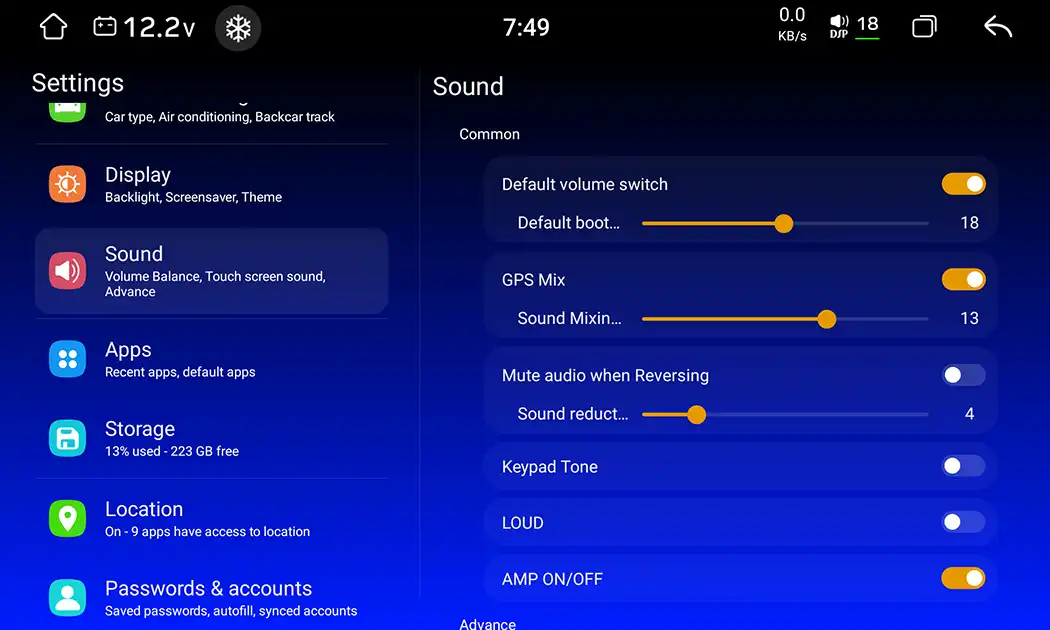
Path: Settings → Sound → Default volume switch. Set the required level in the Default boot submenu.
How to connect a rearview camera?
In cars with a factory rearview camera, the necessary adapter is included in the kit, but in some cases, the OEM camera is not supported and needs replacement. In many budget cars, a camera is not provided from the factory, although this accessory is essential for safe parking.
Solution: detailed instructions for connection, configuration, and troubleshooting can be found in our guide on integrating rearview cameras and 360 systems.
If the camera image is constantly black-and-white, twisted, or flickering:
- make sure the camera ground wire is securely fastened to a clean bare metal point on the body - this eliminates signal interference;
- check the HU settings and select the correct video standard (AHD / NTSC / PAL) and resolution corresponding to your camera.
Does my device support 360 cameras and how to enable them?
This feature is not available on all devices. In most cases, it comes as an option upon buyer request: if they purchase an HU with 360 cameras or plan to use them in the future.
1. How to check for the presence of the 360 module
Path: Settings → About device → System Information

2. How to enable the 360 feature
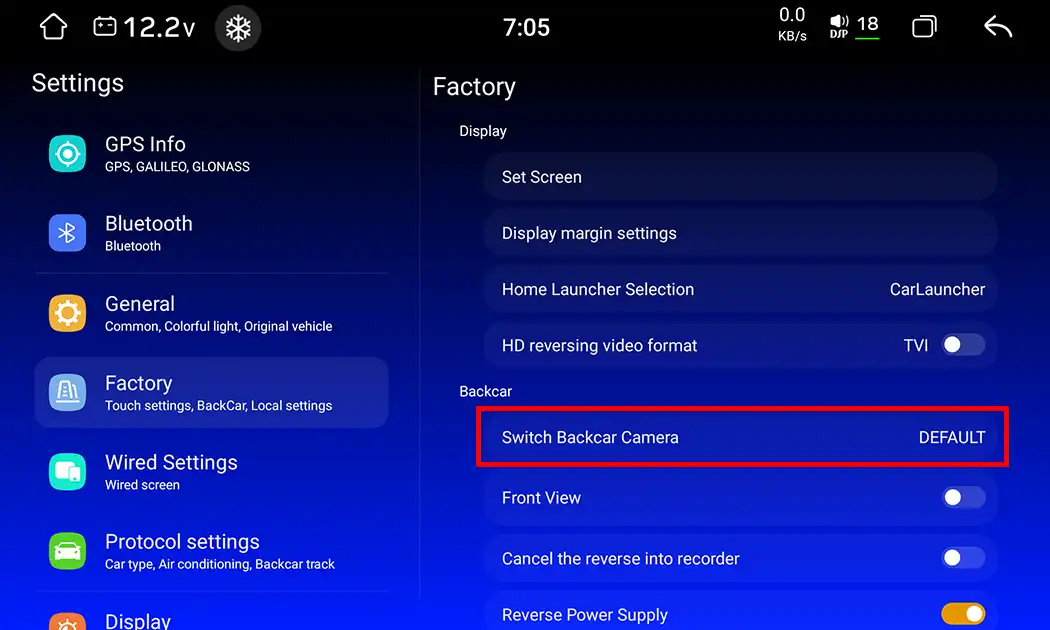
Path: Settings → Factory → Switch backcar camera. Select Inner 360 instead of Default. Code 3368 is required to enter Factory.
3. How to disable the 360 image when turn signals are activated
Path: 360 Settings → Car set. Set the Trigger when turn parameter to Off.
4. What to do if there is a black screen when reverse gear is engaged, but no camera is installed
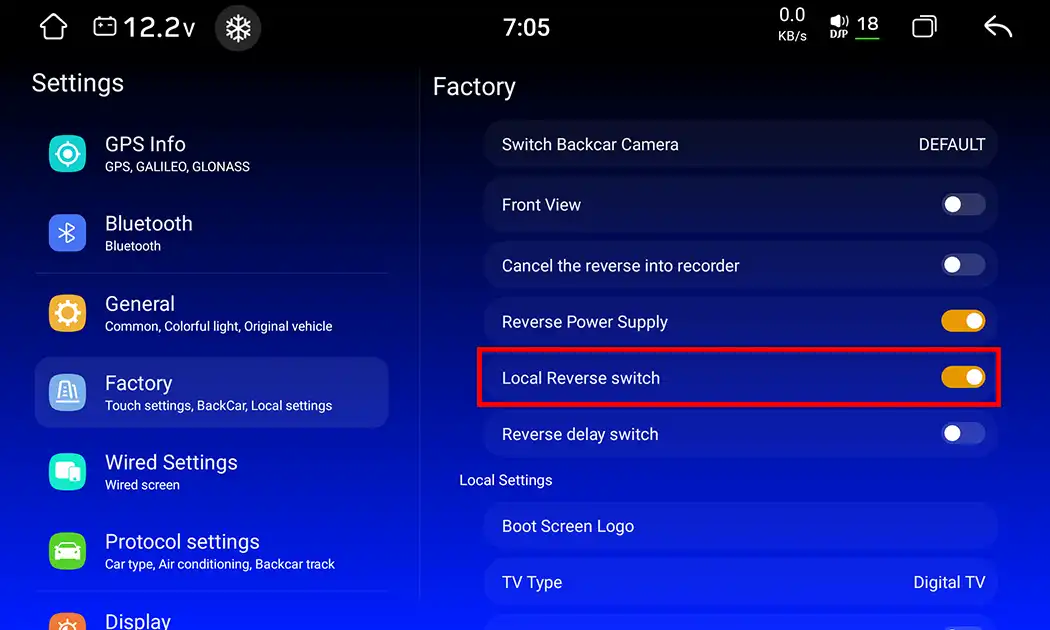
If a rearview camera is not installed, disable the radar: Settings → Factory → Local radar switch - uncheck it. (On some firmware versions, this item may be called Local Reverse Switch.)
How to reduce the minimum screen brightness at night?
Having installed head units for over 15 years, we regularly receive feedback from car owners. One of the frequent requests is insufficient screen dimming at night: a bright screen blinds and distracts the driver from the road.
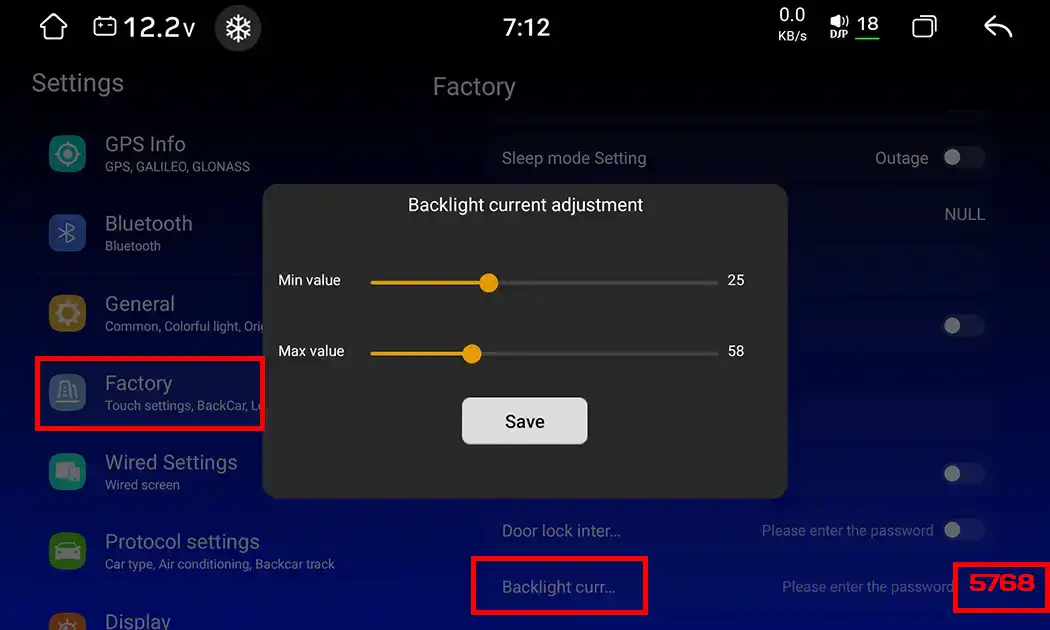
Solution: Settings → Factory (code 3368) → Backlight current adjustment. When prompted for a code for this parameter, enter 5768. Set the minimum brightness threshold.
Be careful: at values that are too low, you can completely turn off the backlight or get matrix flickering. Change the value in small steps.
How to remove the floating button from the screen?
On Android-based HUs with a 2.7 GHz processor (UIS 7870SC), the quick-access floating button may remain active on top of running applications: it covers interface elements and distracts the driver during navigation and multimedia playback.
Solution:
- Open the All Applications menu.
- Find the Touch Assistant utility.
- Disable it - the floating button will disappear from the screen.
The entire process is clearly demonstrated in the video:
How to connect and program steering wheel buttons (SWC)?
Drawing on our extensive experience installing Android devices: steering wheel buttons are of two types - analog resistive (KEY1/KEY2) or digital, operating via the car's CAN-bus. If you are not sure whether your car matches the CAN protocol, check the compatibility guide (DIN size, frames, CANBUS).
Solution:
- Protocol and factory settings check. Before programming buttons, make sure your car's digital data bus is working correctly. Go to Factory Settings → Car Selection (or CAN-bus Settings) and select your car's manufacturer and model, as well as the appropriate protocol decoder (e.g., Raise, Simple Soft, or Hiworld). The system will apply the correct digital commands.
- Access to the learning function. Open the HU main menu, go to Settings → Car Settings, and select the Steering Wheel Control (SWC) learning app designed for the UIS 7870SC platform.
- Clearing previous memory. Click Reset or Clear to delete old profiles.
- Programming physical buttons. Press and hold a physical button on the steering wheel (e.g., volume up), then tap the corresponding icon on the HU screen. Hold the button until the system registers the command.
- Saving and testing. Repeat the procedure for all other buttons, then click Save.
How to connect an auxiliary monitor: is there an RCA video out?
There is no direct RCA video output in these HUs. You can output an image to an external monitor in two ways:
- Via a Type-C to HDMI cable. First activate the video output function: Settings → Video Out.
- Via an adapter. Use a special USB-CVBS to RCA interface cable adapter.
How to turn on the cooling fan?
Cooler operating modes and activation conditions are selected in the system settings.
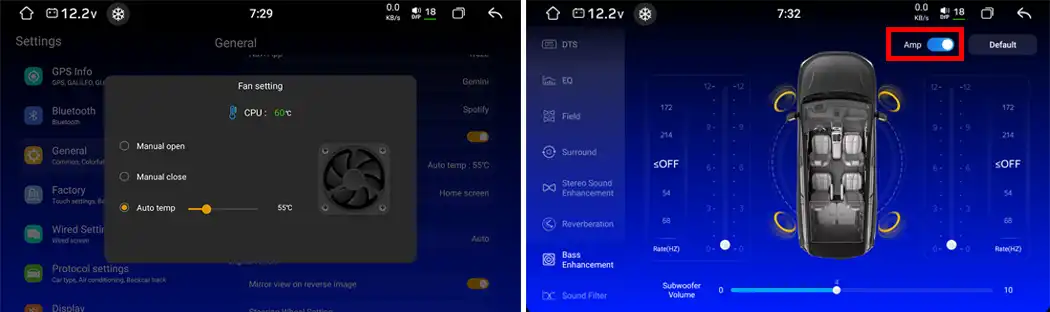
If the fan is enabled in settings but physically does not spin, the fan power wire may be paralleled with the amplifier/subwoofer power supply. In this case, open the Equalizer app, go to the Low Frequencies section, and turn on the amplifier toggle switch.
Quality Configuration is the Key to Long Head Unit Service Life
The UIS 7870 platform with a 2K screen is one of the most powerful and functional automotive multimedia solutions today. You can unleash the full potential of the device and avoid problems with battery discharge or peripheral connection only with proper initial configuration and competent use of service codes.
Choosing a head unit? In our 2026 Processor Comparison: Snapdragon vs. UIS, we broke down how the platforms differ, and you can select a model for your car in the Android head units catalog by car brand.
If you didn't find the answer to your question in this knowledge base or need help choosing a head unit and accessories, the specialists at SMARTY Trend are always ready to consult you and help with configuration.
Will an Android Head Unit Fit Your Car? Complete DIN Size, Dash Kit...
How to Choose RAM and ROM for an Android Car Stereo: 4+64, 6+128,...
How to Set Up DSP Sound on Your Android Head Unit

Android Head Unit Processors Guide 2026: Snapdragon vs. UIS Full...
Does installing an Android screen or digital dash affect the MOT?
 EN
EN DE
DE
 ES
ES
 FR
FR
 IT
IT
 NL
NL
 PL
PL
 PT
PT
 RU
RU